
Unofficial guide hub
Game Is Hard Level Walkthroughs & Solutions
Game Is Hard is a minimalist brain puzzle from Unico Studio where every level breaks the obvious rule — literal prompts, hidden interactions, and device tricks reward slow, exact thinking over guessing.
Jump straight to your stuck level
Browse by 50-Level Ranges
Pick a range and browse every Game Is Hard level.


What is Game Is Hard?
Game Is Hard is a minimalist trick-puzzle game from Unico Studio, available on iOS and Android. Rather than repeating one mechanic, every level breaks an assumption: Level 1 teaches that a drag is required instead of a tap to fuse the Play button, Level 10 asks you to physically shake the phone until the on-screen text glitches away, and Level 75 chains phone tilts with taps to walk a ball through a scripted color sequence of red, blue, red, and green. The common thread across all 300 levels is that the obvious first move is rarely the right one.
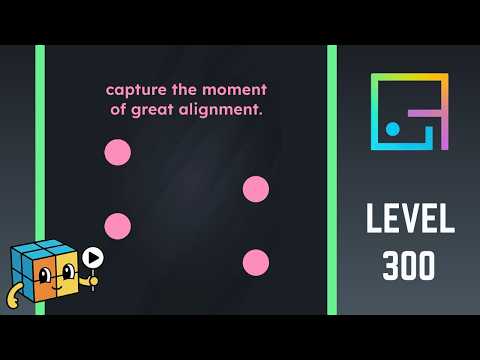
Later levels lean on the same trick-reading skill but raise the stakes. Level 150 turns a shake gesture into an orbit-collision puzzle where a wild shake sends the blue planet into a red square blocker instead of its target. Level 225 hides a number-path logic puzzle behind a 'one down or one up' prompt, where two tempting numbers have to be deliberately left unselected. Level 300 closes the published range with a pure timing puzzle, waiting for four balls to align vertically before capturing the moment with the phone's own hardware screenshot buttons. Difficulty does not climb in a straight line: easy, medium, and hard levels are mixed throughout the whole range, but hard-rated levels are noticeably concentrated in the back third, with only 3 of the 54 hard levels sitting in levels 1-100 compared with 31 in levels 201-300.
LevelSolve has a published walkthrough for all 300 levels of Game Is Hard, which is the game's full level count. Every guide names the exact gesture, tap target, or hidden interaction the level expects, calls out the specific wording trap in the prompt, and lists the moves in order, with a video guide included wherever a matching one exists.
Use the search box on this hub to jump straight to the level number you are stuck on, or browse the range list below to scan ahead.
How to Play Game Is Hard
These tips apply across all Game Is Hard levels. For level-specific advice, open any walkthrough from the range browser above.
- Read the on-screen prompt literally before touching anything. Levels are written exactly as they should be followed, whether that is 'shake your phone' or 'capture the moment of great alignment' — the wording is the instruction, not a hint.
- Try the gesture the level actually asks for before defaulting to a tap. Some levels need a drag, like Level 1's Play button, a phone shake, like Level 10, or a tilt, like Level 75's tilt-and-tap color sequence, and taps alone will not register.
- If a shake or tilt puzzle throws your target into a hazard, use shorter, more controlled motions instead of one strong shake. Level 150's collision puzzle punishes an overly hard shake by knocking the planet into a blocker.
- On number-path or logic-grid levels, distrust the option that looks like the obvious start. Level 225's connected chain deliberately leaves an isolated number nearby that looks like part of the sequence but is not.
- For icon-rebuild levels, think about what the finished icon should look like before rearranging pieces. Level 275 only accepts a shortest-to-tallest staircase, not just any upright arrangement.
- For timing-based levels, wait and watch before acting. Level 300's screenshot puzzle only succeeds in the brief moment of full alignment, not during the more common loose formation.
- If a level triggers a system permission popup for motion or notifications, grant it rather than skipping past it. The shake- and tilt-based levels depend on those permissions to register your input at all.
Want the bigger picture? Read our full strategy guide: how to beat the hardest Game Is Hard levels.
Frequently Asked Questions
-
How many levels does Game Is Hard have?
Game Is Hard has 300 levels in total, and LevelSolve has a published walkthrough for every one of them.
-
How difficult are the Game Is Hard levels?
Difficulty does not climb steadily from level 1 to 300 — easy, medium, and hard levels are mixed throughout. Of the 300 levels, 81 are rated easy, 165 medium, and 54 hard, and the hard-rated levels concentrate heavily in the back third: only 3 sit in levels 1-100, compared with 31 in levels 201-300.
-
Is Game Is Hard free to play?
Game Is Hard is free to download on both iOS and Android. Like most brain-teaser games, it may include optional in-app purchases such as ad removal or hint packs.
-
Are these Game Is Hard walkthroughs official?
No. Game Is Hard belongs to Unico Studio. LevelSolve is an unofficial fan guide.
-
Why doesn't tapping work on some Game Is Hard levels?
Because a number of levels are built around a different input entirely, such as a drag, a phone shake, a tilt, or even the phone's hardware screenshot buttons. Tapping is the default action, so levels that need a different gesture are designed to make a tap look like it should work while it actually does nothing.
-
Do I need to use my phone's motion sensors to finish Game Is Hard?
Yes, for some levels. Shake-based levels like Level 10 and tilt-based levels like Level 75 rely on the phone's accelerometer, and orbit-collision levels like Level 150 use shake motion to launch objects, so motion permissions need to be enabled for those levels to register input.